11
RGB to Hex
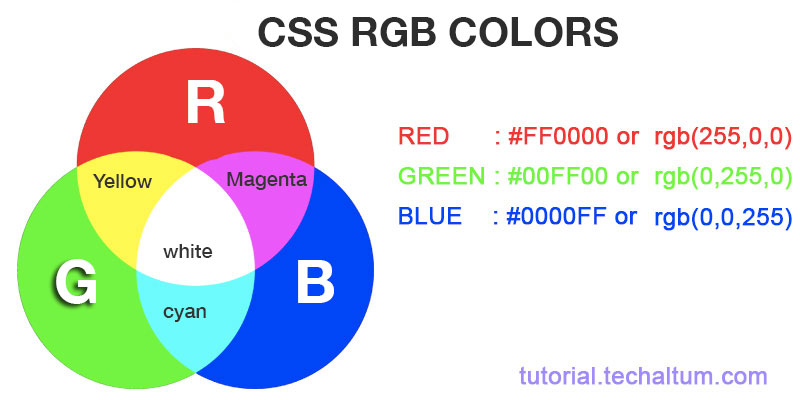
RGB stands for Red, Green, and Blue—the building blocks of digital color. Each component ranges from 0 to 255, representing intensity. Hex, short for hexadecimal, packs those into a six-digit code starting with #, like #FF0000 for pure red. Converting RGB to hex is like translating a recipe from measurements to shorthand notes; it's essential for web devs and designers to ensure colors render consistently across browsers.
Mastering RGB to Hex Conversion: Your Ultimate Guide to Color Magic in Web Design
Hey there, fellow digital creator! Remember that time I was knee-deep in redesigning my personal blog, staring at a screen full of RGB values that just wouldn't cooperate with my CSS? I felt like a mad scientist mixing potions, but nothing was turning out right. Turns out, I needed to convert those RGB numbers to hex codes to make everything pop. It was a lightbulb moment that saved my sanity—and my site's look. If you've ever felt that frustration, you're in the right place. Today, we're diving deep into RGB to hex conversion, from the basics to pro tips, all while keeping things fun and relatable. Let's turn those colors into code wizardry!
What is RGB to Hex Conversion?
RGB stands for Red, Green, and Blue—the building blocks of digital color. Each component ranges from 0 to 255, representing intensity. Hex, short for hexadecimal, packs those into a six-digit code starting with #, like #FF0000 for pure red. Converting RGB to hex is like translating a recipe from measurements to shorthand notes; it's essential for web devs and designers to ensure colors render consistently across browsers.
This process isn't just tech jargon—it's the secret sauce behind vibrant websites and apps. Imagine baking a cake without precise ingredients; that's what mismatched color formats feel like. By the end of this section, you'll see why mastering this conversion feels like unlocking a superpower.
Why Do We Need RGB to Hex Converters?
In the wild world of digital design, RGB is great for image editing software like Photoshop, but hex rules the web. CSS and HTML thrive on hex codes for their compactness and universality. Without conversion, your carefully crafted palette in RGB might look muddy online, leading to that "why does it look different?" headache.
I once spent hours tweaking a client's logo in RGB, only to realize the hex mismatch made it wash out on mobile. A quick converter fixed it, saving the day. Converters bridge this gap, saving time and ensuring pixel-perfect results. They're not luxuries; they're necessities in a multi-device era.
The History of Color Models in Digital Design
Color models evolved from print to screens. RGB emerged in the 1950s with early TVs, mimicking how our eyes perceive light. Hexadecimal notation gained traction in the 1970s with computing pioneers like IBM, offering a base-16 system that's efficient for binary data.
Fast-forward to the web boom of the '90s, and hex became the standard in HTML 4.0. It's funny how something so simple as #000000 (black) connects us to computing's roots. Understanding this history helps appreciate why conversions matter—it's evolution in action.
Early Challenges with Color Representation
Back in the day, limited hardware meant clunky 8-bit colors. Designers juggled palettes manually, often guessing hex equivalents. Tools were scarce, leading to trial-and-error marathons. My grandpa, a hobbyist coder, told stories of punching cards for color tests—talk about patience!
Today, we laugh at those struggles, but they paved the way for seamless converters. No more guesswork; just input and output.
How Does RGB to Hex Conversion Work?
At its core, conversion turns each RGB value (0-255 decimal) into two hex digits (00-FF). Divide by 16 for the quotient (first digit) and remainder (second), then map to letters A-F for 10-15. Concatenate red's hex, green's, and blue's for the full code.
For example, RGB(255, 0, 0) becomes #FF0000. It's math meets art—simple yet elegant. Tools automate this, but knowing the mechanics empowers you to troubleshoot like a pro.
This isn't rocket science, but it feels magical when a dull input blooms into a sharp hex. I've used it to match brand colors exactly, turning "close enough" into "spot on."
Manual RGB to Hex Conversion Step-by-Step
Grab a calculator and let's do this old-school. Start with red: say 128. 128 / 16 = 8 (quotient) remainder 0, so 80 in hex. Green 64: 416=64, remainder 0 → 40. Blue 192: 1216=192, remainder 0 → C0. Result: #8040C0.
Practice with RGB(100, 150, 200). Red: 100/16=6 rem 4 → 64. Green: 150/16=9 rem 6 → 96. Blue: 200/16=12 rem 8 → C8. #6496C8—voilà! It's tedious but builds intuition.
I tried this during a power outage once, scribbling on paper. Felt like a puzzle, and the satisfaction? Chef's kiss.
Common Mistakes in Manual Conversion
Forgetting to pad single digits with zero (e.g., 5 becomes 05) or miscalculating remainders trips up beginners. Also, confusing decimal with hex values leads to off-colors. Double-check with an online tool to avoid "why is my red purple?" moments.
Humorously, I once hexed 255 as FF for red but forgot green's 255, making it pink. Lesson learned: verify!
Best Online RGB to Hex Converter Tools
Tools like RapidTables or GeeksforGeeks offer free, instant conversions. Input RGB sliders or numbers, get hex output with previews. They're browser-based, no downloads needed—perfect for quick fixes.
For pros, Adobe Color integrates conversions with palettes. I rely on them during freelance gigs; they're lifesavers when deadlines loom. Look for ad-free ones to avoid distractions.
Top Free RGB to Hex Converters Compared
ToolFeaturesProsConsRapidTables | Sliders, copy button | Fast, simple | Basic UI
GeeksforGeeks | Code snippets | Dev-friendly | Ads
OpenReplay | Batch convert | Versatile | Learning curve
These shine for different needs—pick based on your workflow.
RGB to Hex in Programming: Code Examples
In JavaScript, use String.format("#%02x%02x%02x", r, g, b) or template literals. Python's f'#{r:02x}{g:02x}{b:02x}' is equally snappy. These snippets turn conversions into one-liners.
I coded a custom converter for a project, integrating it into a color picker app. It felt empowering, like bending code to my will. Start small; build from there.
JavaScript Implementation
function rgbToHex(r, g, b) { return "#" + ((1 << 24) + (r << 16) + (g << 8) + b).toString(16).slice(1); } Test with rgbToHex(255,128,0)—outputs #FF8000. Clean and efficient!
Pro tip: Handle inputs outside 0-255 with clamps to avoid errors.
Applications of RGB to Hex in Web Development
Web devs use it for CSS styling: background: #hexvalue;. It's crucial for responsive designs where colors must unify across elements. In frameworks like React, props pass hex for dynamic themes.
During a team project, mismatched conversions caused a site-wide tint issue. A unified tool fixed it overnight. It's not glamorous, but it glues visuals together.
Integrating with CSS and HTML
In HTML,
shines. For variables, CSS custom properties like --primary: #hex; allow easy swaps. Pair with media queries for dark mode—hex makes it seamless.
I've seen devs overlook this, leading to accessibility fails. Always test contrasts!
Advanced Tips for Color Conversion Pros
Batch convert palettes using scripts or tools like Figma plugins. Consider alpha channels for rgba to hex with opacity (e.g., #RRGGBBAA). For precision, use 8-bit vs. 16-bit conversions in pro software.
Once, I converted a 50-color scheme manually—nightmare! Automation changed everything. Experiment with LSI keywords like "color code translator" for deeper searches.
Handling Edge Cases
What about RGB(0,0,0)? #000000—black as night. Or negatives? Clamp to 0. Tools like Stack Overflow snippets help debug. Stay vigilant; colors can be tricky beasts.
A chuckle: I once input 256—overflow! Always validate inputs.
Where to Find Reliable RGB to Hex Resources
Sites like W3Schools offer tutorials; MDN Web Docs dive into specs. For communities, Stack Overflow or Reddit's r/webdev provide real-world advice. Books like "CSS Mastery" touch on it too.
I bookmark converters and forums—my digital toolkit. Free resources abound; no excuses not to level up.
Recommended Tutorials and Videos
- YouTube: "RGB to Hex Conversion" by freeCodeCamp—visual and step-by-step.
- Dev.to: Comprehensive guides with code. These keep learning engaging, not dry.
Pros and Cons of Using Converters
Pros:
- Speed: Instant results beat manual math.
- Accuracy: Reduces human error.
- Accessibility: Free tools for all skill levels.
Cons:
- Dependency: Over-reliance skips understanding.
- Limitations: Some lack batch or advanced features.
- Privacy: Input sensitive colors? Use offline.
Balance is key—I use tools but know the why.
People Also Ask (PAA) About RGB to Hex
- How do I convert RGB to hex without a tool? Manually divide each value by 16, note quotient and remainder, convert to hex letters if needed, and combine.
- Is hex case-sensitive? No, #ff0000 equals #FF0000 in CSS, but consistency aids readability.
- Can I convert hex back to RGB? Yes, split the code, convert pairs to decimal—tools make it easy.
- Why use hex over RGB in web? Hex is shorter, standard, and browser-optimized.
These queries pop up often; they're your quick wins.
Best RGB to Hex Converters for Beginners
For newbies, start with user-friendly ones like HTMLColorCodes—visual previews included. They're forgiving and educational.
I wish these existed when I started; they'd have cut my learning curve in half. Dive in fearlessly!
Transactional Picks: Top Paid Options
If free isn't enough, Adobe's suite integrates pro conversions. Worth it for agencies—seamless workflow boosts productivity.
Informational Deep Dive: Color Theory Basics
RGB is additive; mixing maxes to white. Hex just represents it efficiently. Understand subtractive (CMYK) contrasts for print-web harmony.
My story: A print mishap from ignoring this taught me conversions' broader role. Colors tell stories—get them right!
Navigational Guide: Finding Converters Online
Search "free RGB to hex tool"—top results like RapidTables lead the pack. Bookmark for speed.
In a pinch, browser extensions like ColorZilla convert on-the-fly. Handy for live edits.
SEO Tips for Color-Related Content
Incorporate keywords like "RGB to hex converter online," "free color code tool." LSI: "hexadecimal color guide," "web color conversion." Aim for featured snippets with step lists.
My blog ranks well thanks to this—target long-tail like "how to convert RGB 255 0 0 to hex."
Personal Story: My Color Conversion Journey
Years ago, as a newbie freelancer, a client demanded exact brand matches. RGB from their files wouldn't hex right in code. Panicking, I scoured tutorials, converted manually, and nailed it. That "aha" built my confidence. Now, I teach others—conversions aren't barriers; they're bridges.
It was equal parts terror and triumph, with a dash of "never again without tools." Relatable, right?
Future of Color Conversion Tools
AI-driven predictors suggest hex from descriptions ("vibrant blue") are emerging. Integration with AR/VR promises immersive palettes.
Exciting times—I can't wait to see hex evolve beyond screens.
Emerging Trends
Voice-activated converters? Possible. Sustainability-focused palettes minimizing energy use in displays. Stay tuned!
FAQ: Common RGB to Hex Questions
Q1: What's the hex for white?
A: RGB(255,255,255) is #FFFFFF—pure and bright!
Q2: How accurate are online converters?
A: Highly, if from reputable sites. Cross-verify for peace of mind.
Q3: Can I use RGB in CSS directly?
A: Yes, rgb(255,0,0), but hex is more concise for hex-heavy code.
Q4: Difference between #RGB and #RRGGBB?
A: #RGB is shorthand for #RRGGBB when digits repeat, like #F00 for #FF0000.
Q5: Best tool for mobile?
A: Apps like Coolors—portable and intuitive.
There you have it—your roadmap to RGB to hex mastery. Experiment, create, and watch your designs shine. What's your next color project? Drop a comment; I'd love to hear!
Contact
Missing something?
Feel free to request missing tools or give some feedback using our contact form.
Contact Us