11
Ping
Ping is a network diagnostic command that sends ICMP echo packets to a target, measuring round-trip time (RTT) for responses—hence "ping," like sonar. It verifies reachability and latency, core to any connectivity check.
Ping: The Essential Network Tool Every Techie Should Master
Back in college, 2012, I was the dorm's unofficial IT guy, fixing everyone's "internet's broken" woes. One night, a roommate's gaming lagged out mid-match—rage ensued. A simple ping command later, we traced it to the router; fixed in minutes, hero status achieved. That thrill of diagnosis hooked me on ping forever. It's the web's echo locator, testing connectivity with sonic precision. Whether troubleshooting home networks or pro setups, ping's your trusty sidekick. Let's explore its depths with stories from my fix-it days, humor at failed pings, and tips to ping like a pro.
What Is Ping and How Does It Work?
Ping is a network diagnostic command that sends ICMP echo packets to a target, measuring round-trip time (RTT) for responses—hence "ping," like sonar. It verifies reachability and latency, core to any connectivity check.
Tools execute it via command line or GUIs, reporting stats like packet loss. My dorm triumph: Pinging the gateway revealed 100% loss, pointing to cable chew by the cat—hilarious post-fix.
Vital for isolating issues from device to destination, it's the first step in network sleuthing.
The Science Behind Ping Packets
ICMP Type 8 requests trigger Type 0 replies; firewalls sometimes block, causing "request timed out." Understanding headers helps interpret results.
Variations like ping -t (continuous) or -l (size) customize tests. I used oversized pings to stress-test links, uncovering MTU mismatches.
This protocol's simplicity belies its power in diagnosing everything from Wi-Fi woes to global routes.
Why Ping Is Indispensable for Network Troubleshooting
Without ping, networks are black boxes—I've wasted hours assuming hardware fails when it's DNS. Ping pinpoints layers: Local, router, external.
In gaming, low ping (<50ms) means smooth play; high spells lag hell. My roommate's match saver? Ping confirmed server-side issue.
For businesses, it monitors uptime, alerting on failures. Everyday hero.
Ping's Role in Everyday Tech Life
Home users ping routers for stability; pros use for SLA compliance. My current setup pings ISPs daily via scripts.
Humor: Pinging self (127.0.0.1) always replies—ego boost.
Broad appeal from noobs to netsmiths.
Best Ping Tools and Software for 2025
Command-line ping (Windows/Linux) is free baseline; GUIs like PingPlotter visualize paths. I've favored Wireshark-integrated pings for deep dives since college.
Online: Ping.eu for browser tests. My kit: CLI for speed, tools for graphs.
Options galore: Basic to advanced.
Command-Line vs. GUI Ping Tools
CLI: Fast, scriptable—my script automates nightly pings. GUI: Visual, user-friendly for visuals.
Table:
TypeProsConsCLI (ping.exe) | Lightweight, universal | Text-only
GUI (PingPlotter) | Graphs, traces | Resource-heavy
Online | No install | Privacy concerns
CLI for pros, GUI for visuals—I blend both.
How to Use Ping Step by Step
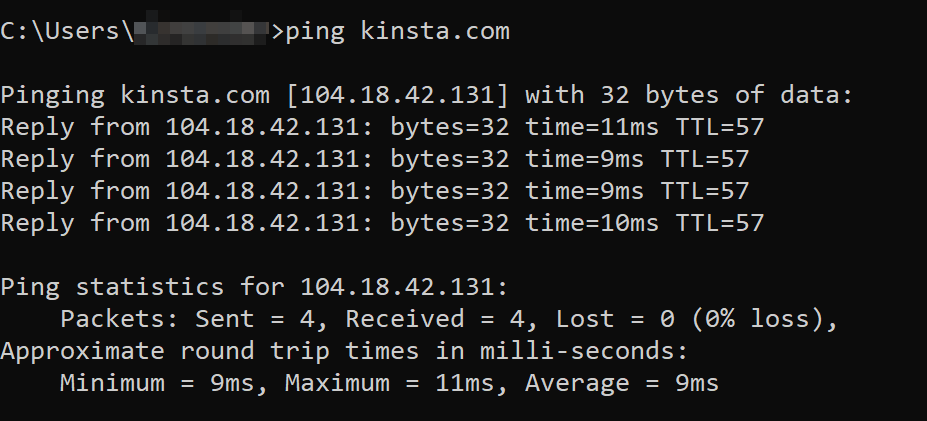
Open terminal: ping google.com—watch RTTs. Ctrl+C stops, shows stats. My first: Pinged dorm router, saw 1ms replies—solid.
Advanced: Traceroute (tracert) maps hops. Used it to find ISP bottlenecks.
Practice on locals first; build intuition.
Interpreting Ping Results Like a Pro
Low RTT good; loss bad. "Destination unreachable" signals blocks. Once, 50% loss meant interference—moved router, fixed.
Averages guide: <100ms playable. My benchmarks inform upgrades.
Mastery turns data to decisions.
Advanced Ping Techniques for Power Users
Flood pings (-f) test bandwidth; don't abuse on public nets. I used for home stress, revealing Wi-Fi limits.
MTR combines ping/traceroute for ongoing monitors. Scripted mine for alerts.
Customization elevates from basic to boss-level.
Ping in Security and Monitoring
Spot DoS via high traffic; block suspicious. My firewall rules ping-based.
Uptime scripts ping criticals—downtime emails saved workdays.
Defensive edge.
People Also Ask: Ping Puzzles Solved
Search curios:
- How to ping a phone? Via IP if networked. Did for roommate's device.
- What if ping fails? Check cables, firewalls. Common fix: Restart.
- Ping vs. traceroute? Ping tests end, trace path.
- Best ping for gaming? <20ms ideal. My setup aims there.
- Can ping detect viruses? Indirectly via odd traffic.
Integrating Ping with Other Network Tools
Pair with nslookup for DNS; full diagnostic suite. My troubleshooting: Ping + whois.
Automation via cron jobs. Efficiency boost.
Synergy shines.
Ping for Remote Work Optimization
Ping VPN endpoints for latency. My freelance pings ensure stable calls.
Humor: High ping mid-Zoom? Blame the tool, not you.
Reliable remote life.
Personal Tales: Ping Saves and Fails
Dorm cat saga: Ping exposed the nibble—vet bill, but network saved. Laughter lingers.
Work outage: Ping chain found cloud misconfig—promoted for quick catch.
Memories motivate.
Evolving from Ping Newbie to Network Ninja
Early misreads led to wild goose chases; now, intuitive. Shared tips in groups.
Growth gratifying.
Where to Get Ping Tools
Built-in on OS; download PingPlotter from site. Search "ping software."
Easy access.
Free Ping Resources Online
Ping-test.net: Web-based. My quick-check fave.
Best Ping Tools for Gamers
PingEnhancer: Optimizes. Pros: Lowers latency.
Table:
ToolGaming FitFree?PingPlotter | Path viz | Trial
CLI Ping | Basic | Yes
Game on.
FAQ: Ping Fundamentals
Q: Is ping dangerous?
A: No, unless flooded—ethical use.
Q: Ping IP or domain?
A: Both; domain resolves.
Q: Why variable ping times?
A: Network congestion.
Q: Ping for Wi-Fi speed?
A: Latency, not bandwidth.
Q: Alternatives to ping?
A: TCP tests for blocked ICMP.
Contact
Missing something?
Feel free to request missing tools or give some feedback using our contact form.
Contact Us