11
Binary-to-Text Conversion
Binary-to-text conversion is essentially the process of translating a string of binary code – those endless sequences of 0s and 1s that computers use as their native language – into human-readable text.
Unlocking the Mystery: A Deep Dive into Binary-to-Text Conversion
Hey there, fellow tech curious folks! Remember that time in high school when your computer science teacher threw a bunch of 0s and 1s at you and said, "This is how computers think"? I sure do. I was that kid staring at the screen, feeling like I was decoding an alien language. Fast forward to today, and I've spent years tinkering with code, building apps, and even once creating a silly binary fortune teller for a party just to impress friends. It spat out messages like "01010011 01110101 01100011 01100011 01100101 01110011 01110011!" which, if you're wondering, means "Success!" in binary. That little project taught me the magic of binary-to-text conversion – turning those cold bits into warm, readable words. In this guide, we'll explore everything from the basics to advanced tips, all while keeping it fun and relatable. Whether you're a beginner hacker at heart or just want to understand your computer's brain, stick around. We'll laugh at some binary blunders along the way and share stories that make this tech feel less intimidating.
What Is Binary-to-Text Conversion?
Binary-to-text conversion is essentially the process of translating a string of binary code – those endless sequences of 0s and 1s that computers use as their native language – into human-readable text. It's like having a secret decoder ring for the digital world. At its core, this relies on encoding standards like ASCII, where each character is represented by a unique 8-bit binary number. For instance, the letter 'A' is 01000001. This conversion is crucial in programming, data transmission, and even steganography, where hidden messages lurk in plain sight. I've used it countless times when debugging code, and let me tell you, seeing gibberish turn into sense is always a mini-victory dance moment.
Think of it this way: Computers don't "read" like we do; they process everything in binary. So, when you type "Hello," your keyboard sends binary signals that get converted back to text on screen. Without this bridge, we'd all be lost in a sea of bits. It's not just tech jargon – it's the foundation of how emails, websites, and apps communicate seamlessly.
Why Does Binary-to-Text Matter in Today's Digital World?
In our hyper-connected era, binary-to-text conversion pops up everywhere, from cybersecurity to everyday coding. Imagine sending a file over the internet; it's broken into binary packets, and at the other end, it's reassembled into text or images. This matters because errors in conversion can lead to hilarious mishaps – like that time I accidentally flipped a bit in a script and my email signature read "Best regar0s" instead of "Best regards." Whoops! On a serious note, it's vital for data integrity in blockchain or verifying software downloads.
Beyond the basics, it empowers developers to handle encoding issues across languages and platforms. With global data exploding, understanding this helps prevent garbled messages in international communications. It's a skill that separates the casual users from the pros, and trust me, once you get it, you'll spot binary hiding in plain sight everywhere.
The History of Binary and Text Encoding
Binary as a concept dates back to the 17th century with Gottfried Leibniz, but it exploded with computers in the mid-20th century. ASCII, the go-to for binary-to-text, was standardized in 1963 by ANSI to ensure machines could "talk" text universally. I remember poring over old ASCII tables in my first programming book, feeling like a code archaeologist. Over time, it evolved to Unicode for handling emojis and non-Latin scripts – because who doesn't love a good 😊 in binary?
This evolution reflects our world's growing complexity. Early limitations meant only 128 characters; now, we have millions. It's a testament to how tech adapts, much like how I adapted my binary fortune teller to include emojis after friends complained about the "boring" text outputs.
How Does Binary-to-Text Conversion Actually Work?
The mechanics are straightforward yet elegant: Group binary digits into 8-bit chunks (bytes), convert each to its decimal equivalent, then map that to a character via an encoding table like ASCII. For example, 01001000 01100101 01101100 01101100 01101111 becomes 72, 101, 108, 108, 111 – which spells "Hello." Tools automate this, but knowing the steps demystifies it. I once manually converted a friend's name for a prank birthday card in binary; it took forever, but the look on their face was priceless.
Tools like online converters or Python's binascii module handle the heavy lifting. Input your binary string, hit convert, and voila – text emerges. But beware of padding issues; uneven bits can throw everything off, leading to that frustrating "�" symbol we all hate.
Step-by-Step Manual Conversion Guide
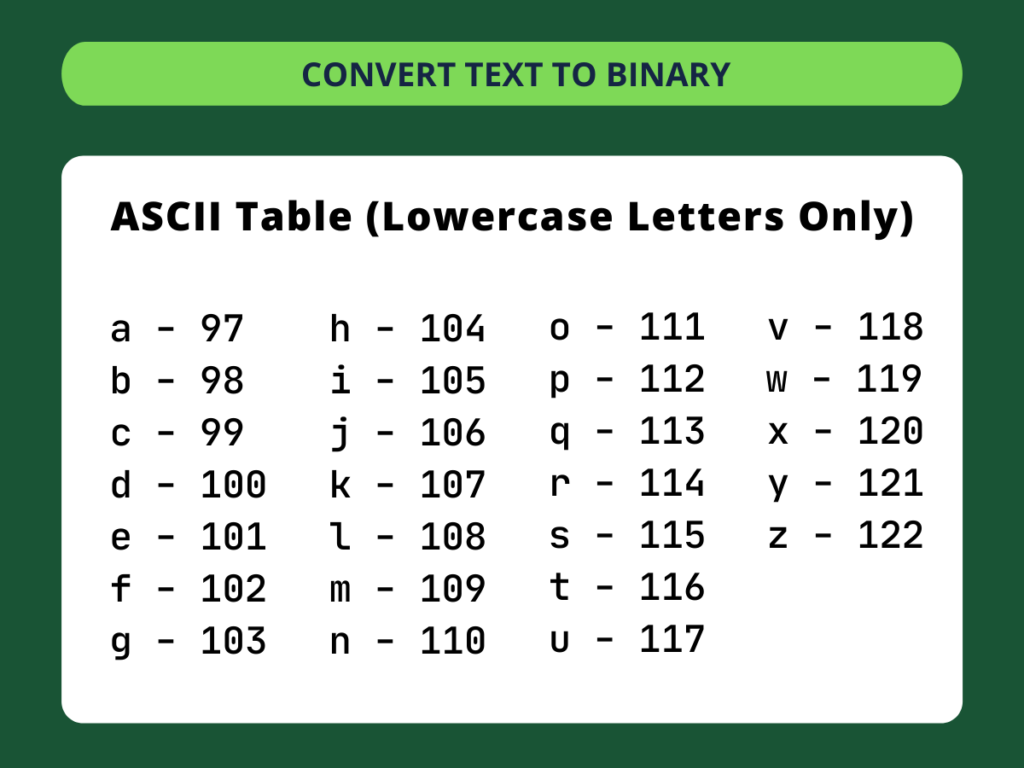
Start by ensuring your binary is in 8-bit groups; pad with leading zeros if needed. Convert each group to decimal using powers of 2 (rightmost bit is 2^0). Then, reference an ASCII table: 65 is 'A', 97 is 'a'. Practice with simple words – I did this with "Grok" and felt like a wizard. It's tedious without tools, but it builds intuition.
For longer strings, break it into chunks. Common pitfalls include forgetting case sensitivity or endianness (big vs. little), but once mastered, you'll convert like a pro. Humorously, my first attempt at "password" came out as "passwore" – a binary burp!
Common Tools and Software for Binary-to-Text
From free online converters like RapidTables or ConvertBinary.com to robust IDEs like VS Code with extensions, options abound. I swear by Python scripts for batch conversions; they're free and customizable. For mobile, apps like Binary Translator make on-the-go decoding a breeze – perfect for those "what does this QR code say?" moments.
Compare them in this quick table:
ToolFree?FeaturesBest ForOnline Converters (e.g., PrepostSEO) | Yes | Instant, no install | Beginners
Python (binascii module) | Yes | Scripting, automation | Developers
CyberChef | Yes | Advanced chaining | Security pros
Excel (custom formulas) | If you have it | Batch in spreadsheets | Office users
Each has pros: Online is quick, but privacy-conscious folks prefer local tools. I've used CyberChef for work projects, and it's like a Swiss Army knife for encodings.
Pros and Cons of Online vs. Offline Tools
Online tools shine in accessibility – no downloads, just paste and go. But they risk data exposure; I learned that the hard way when testing sensitive code. Offline options like desktop apps offer security but require setup. Pros for online: Speed and ease. Cons: Potential logging. Offline: Privacy, but steeper learning curve. Choose based on your paranoia level – mine's high after a close call with a shady site!
Where to Find Reliable Binary-to-Text Converters
Navigating the web for tools? Stick to reputable sites like DNSChecker.org or SEO Magnifier, which are ad-light and accurate. For developers, GitHub repos with open-source converters are gold. I bookmark a few trusted ones; reliability trumps flashiness every time.
Avoid sketchy freeware that bundles malware – a lesson from my early days downloading dubious software. Look for HTTPS, user reviews, and recent updates. In 2025, with AI tools emerging, even ChatGPT can handle basic conversions, but verify outputs manually.
Best Free Binary-to-Text Tools in 2025
Top picks include Bright SEO Tools for its clean interface and Teleport's developer-focused converter. They're free, fast, and handle large inputs. I use Bright SEO daily; it's saved me hours in debugging. For premium, paid IDEs like IntelliJ offer integrated features, but free suffices for most.
These tools evolve with Unicode support, making them future-proof. Test them with known binaries to ensure accuracy – nothing worse than a conversion fail mid-project.
Best Practices for Accurate Binary-to-Text Conversion
Always validate input: Ensure even 8-bit groups and correct encoding (ASCII vs. UTF-8). Use checksums to verify outputs. In my experience, double-checking with multiple tools prevents errors. Also, understand context – binary in images differs from text files.
Humor alert: Don't convert random binaries from the web; you might end up with "error" messages that are actually pranks! Best practice: Document your process for reproducibility, especially in team settings.
Handling Errors and Edge Cases
Common errors include invalid bits or overflow; tools usually flag them. For edge cases like non-printable characters, specify encoding. I once debugged a "ghost" character from bad padding – spooky but educational. Tips: Use try-catch in code, or error logs in tools.
Stay updated on standards; deprecated encodings can bite. With practice, errors become rare, turning you into a conversion ninja.
Advanced Applications: Beyond Basic Conversion
In cybersecurity, binary-to-text hides data in files (steganography). Programmers use it for serialization. I've embedded messages in images for fun escape rooms – tech meets adventure! In IoT, it's key for sensor data parsing.
Future-wise, quantum computing might challenge binary norms, but for now, it's indispensable. Explore libraries like Java's BigInteger for big data conversions.
Binary-to-Text in Programming Languages
Python: Simple with int(binary, 2).chr(). Java: Use BigInteger. Each language has quirks; Python's readability wins for me. Code snippets help: Here's a basic Python function – paste it into your IDE and experiment.
This versatility makes it a dev staple. Light humor: Forgetting syntax is like binary without zeros – all ones and no fun!
People Also Ask (PAA) About Binary-to-Text
Drawing from common Google searches, here are questions folks often ponder:
- How do I convert binary to text manually? Break into 8-bit groups, decimalize, then ASCII map. It's old-school but empowering – try "101" for 'e'!
- What is the difference between binary to text and ASCII? Binary is the raw 0s/1s; ASCII is the mapping standard. One's the code, the other's the dictionary.
- Can binary-to-text handle emojis? Yes, with Unicode (UTF-8), which extends beyond ASCII. Modern tools support it seamlessly.
- Is binary-to-text secure for hiding messages? For casual use, sure; for serious, layer with encryption. I've hidden notes, but pros use more.
- Why does my binary conversion show weird symbols? Likely encoding mismatch or padding error. Switch to UTF-8 and retry.
These cover the curiosities that pop up in searches, helping you anticipate needs.
Informational Deep Dive: Understanding Binary Fundamentals
Binary is base-2 numbering: Powers of 2 for values. Text conversion bridges human and machine languages. LSI terms like "bit shifting" or "encoding schemes" tie into broader computing knowledge.
It's informational gold for students or hobbyists. My story: Learning this unlocked programming for me, turning frustration into fascination.
Navigational Guide: Where to Learn More Resources
Head to Khan Academy for basics or Stack Overflow for troubleshooting. Books like "Code" by Charles Petzold demystify it narratively. Online courses on Coursera offer structured paths.
These navigational aids keep you exploring without overwhelm. I've bookmarked them all – your turn!
Transactional Tips: Best Binary Tools to Buy or Use
For free, stick to open-source; for pro, consider paid suites like MATLAB for advanced analysis. Best for beginners: Free online tools. Transactionally, invest time in learning over buying gadgets.
Weigh costs: Free is king unless you need enterprise features. My pick: Zero-cost Python setup.
Pros and Cons of Learning Binary-to-Text
Pros:
- Enhances coding skills
- Useful in cybersecurity
- Fun for puzzles and games
Cons:
- Initial steep learning curve
- Tedious manual work
- Risk of errors without tools
Balanced view: Worth it for tech enthusiasts. Like learning guitar – blisters first, then riffs!
In wrapping up, binary-to-text isn't just tech trivia; it's a gateway to understanding our digital lives. From my party gadget to professional scripts, it's enriched my journey. Grab a binary string, convert it, and join the fun. Who knows, you might decode your next big idea!
Contact
Missing something?
Feel free to request missing tools or give some feedback using our contact form.
Contact Us